Monday, November 20, 2017

web browsing... in DOS

Web browsing... in DOS


modern browsing in dos isn't exactly a cakewalk, i mean sure, being able to do some minimal things in, say links, can be a huge help, but you can only do so much on today's internet without HTML5, javascript, and ipv6...

Dillo

Dillo Splash screen - Dillo

Dillo, a super-lightweight browser that is mainly developed for unix-like systems, has a fork for dos, or rather a fork of a windows port that isn't associated with the main dillo development team, and that has various bugs, but at least has tabs and multiple windows... I give it credit for that much...

The user interface is similar to the standard *nix Dillo,  with FLTK, css, and the usual screen layout. the bookmarks work like a drop-down menu instead of a DPI-generated webpage. One thing not found in the "official" dillo, is a configuration dialog. a useful feature. though this version of dillo lags when the mouse is over certain elements of the ui like links and text boxes. noticeable even on a 397Mhz Pentium II, and can make dillo for dos nearly unusable in a slower VirtualBox vm.

unfortunately, even this ports upstream, unix-like cousin, is still working on implementing https, and this port has a few strange issues, such as the file loading dialog spitting out junk into the path box when you try to navigate or even press backspace, and on occasion the browser will just crash, leaving the user unceremoniously at a DJGPP fault screen...

Arachne

FreeDOS website - arachne

Arachne is an impressive dos internet suite, that has quite a few interesting features, and even its own add-ons, it has a file manager, a "desktop", bookmarks, ftp support, email, and even partial gopher support.

The user interface is responsive enough, even if it looks a tad dated in 2017. While links is designed with a minimalist UI, arachne is clean on the other end of the spectrum, with fancy features like "virtual screen" scrolling, an a huge sidebar to the right of the screen. Arachne is somewhat unusual in that most of its features and setup screens work like local web pages.

The problem is, the web browsing isn't exactly up to modern standards, lacking even https, and also suffers from some rather dated design decisions, decisions that might have made sense in its day, but in 2017... not so much...

jpeg and png images are converted to bitmaps before being cached, (yes you read that right) and if your system doesn't have its temp folder on a ramdisk, expect delays... and the lack of https support means that many webpages fail to load at all, even when they are ipv4...

links

FreeDOS website - links

links is by far my most-used dos browser, like the other browsers here, it can't do ipv6, (though thats actually a network stack limitation, as links on other systems can load ipv6 just fine)

The user interface is sparse, and can prove tedious for someone who doesn't know the keyboard shortcuts. images look fine, text is quite readable, though I'm curious, why the giant mouse cursor?

at one point links had javascript support, but it was disabled, but as far as both text browsers and graphical browsers, links tends to be the most usable, given its the only one of the three Ive mentioned here that actually can load https webpages... and its also the only one with an update within the past 4 years... considering links' dos port is considered beta quality, its surprisingly reliable and stable. and at least i can search DuckDuckGo using this one...

what i think a modern dos browser needs

  • HTML5
  • javascript (I know, but this thing is here to stay for a long time)
  • file manager (this is one of the things i like about arachne, though a dedicated file manager component would be even better, and proper file load and save dialogs are even more so of a necessity)
  • proper, windowed UI. (this is one of DilloDOS's strongpoints... perhaps that DOS FLTK port could be used?)
  • support for http/https and ipv4/ipv6, ftp, ect.
Other Ideas:
  • perhaps it should have a few tools, like a calculator and editor?
  • irc client?
Feel free to share some thoughts in the comments.

screenshots captured from within virtualbox.

Wednesday, October 18, 2017

old tech - 1980s sounddesign 4-in-one stereo

digital composite of both photos shown below.
1988 soundesign dual deck stereo, with AM, FM, 8-track, dual cassette, and an alarm clock.


status:
  • cassette deck: needs belts, right channel is a bit noisy.
  • 8-track: working
  • clock: working
  • AM/FM tuner: working. indicator seems to need a bulb.
  • visualizer: left visualizer needs a bulb
found: at a thrift shop.
main usage: drive 4 8-ohm speakers in a 2-channel, stereo-surround arrangement, connected to a laptop via a 3.5mm to RCA adapter cable.

description: This monster of a stereo makes the modern laptop its used with look puny in comparison. Its not a top-of-the-line unit, but it does get the job done, and definitely has enough chrome.


no flash, yes i know the tuner and left visualizer need bulbs.

with flash.

Wednesday, July 19, 2017

Sunday, June 18, 2017

SBTCVM has moved!

Well, after considerable thought, i decided SBTCVM needed a GitHub organization to be more unified, so, yea.

check out the new links.

SBTCVM on github

SBTCVM Project Home

SBTCVM Mark 2


any questions, feel free to ask.

Friday, June 2, 2017

Desutezeoid 1.5.* series.

Desutezeoid 1.5.0 has been released, and the first big change of the 1.5.x series has happened. the rendering system now iterates through all core object types at once, following the order of core objects in the actual XML. global core objects are still on top, but now ordered similarly.

what else could the 1.5.x series bring? more fork and core types for one thing. perhaps even some better
animation support when and if i get around to it.

that said, v1.5.0 is A LOT more capable, and faster, and smoother than the old 1.1.x and 1.2.x series versions, and is already capable of animation, though more means of animating things wouldn't hurt.


you may be wondering: What can v1.5.0 do? well. best way to answer that question is to download it and try the included test program. it includes nifty demos including a thunderstorm effect, flashlight effect, and even a few simple-to-implement mouse-following panoramic screens.

you can download it here

Thursday, June 1, 2017

Balanced ternary: Overhauling libbaltcalc's aging, clunky API

new libbaltcalc 3.x series.
 while the old balance ternary integer string API is still present, its been cleaned up a bit. also a new class-based API now exists.

the btint class provides a more seamless API in python.

as an example lets add 2 and 4
old API:
>>>import libbaltcalc
>>>int1=libbaltcalc.DECTOBT(2)
>>>int2=libbaltcalc.DECTOBT(4)
>>>print libbaltcalc.btadd(int1, int2)
+-0

the new btint class can accept integers, balanced ternary integer strings, and other btint instances as an argument. not only that, but all supported mathematics operations return btint instances. and btint instances can be printed and used quite simply.

new API:
>>>import libbaltcalc
>>>from libbaltcalc import btint
>>>int1=btint(2)
>>>int2=btint(4)
>>>print int1 + int2
+-0

Now wasn't that easier?

new libbaltcalc documentation

Monday, May 29, 2017

Game Development: Working on Rhennevad Escape again!

the title screen is now animated.
its been a while since i worked on this game.  The basic premise is its a Island themed, Point and click escape adventure.

Its powered by Desutezeoid (ignore the version number in the screenshot)

Whats Desutezeoid? Well, its my point and click game engine. written in python and using the pygame SDL bindings.

Ive done some more remixes of the Rhennevad Theme music, and have included a few of them. ive started work on chapter 1 again, and various screens and such now use the new image scrolling capacity to their advantage. for example in the title screen, a boat and a shark will move across that picture, and those clouds actually move.

I'll post about this game more as it develops.

Sunday, May 28, 2017

Desutezeoid: v1.4.2 released.

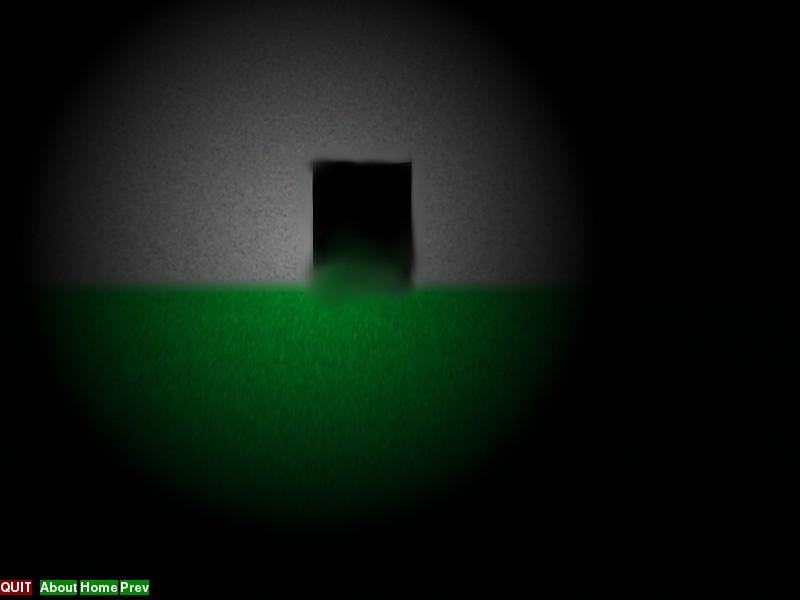
a mouse-following mask creates a flashlight effect.
Download it here


Desutezeoid. my XML-driven, pygame-powered Point and click engine.  Featuring a page-based structure, object-based scripting, popup dialogs,  image, sound, text, and music support and more.

v1.4.2 adds various new features and improvements.

a literal "x" and "y" follow the mouse
the new mouseh and mousev img attributes allow various modes of following the mouse pointer position, including an inverted mode that's used to great effect in the demo program to show a wide panoramic image.

The demo provides 2 example panoramic views
the new hscroll and vscroll img attributes provide a means of continuously scrolling images. Such can be used in a variety of ways. such as moving clouds. visuals moving across a background, and more!


Dezutezeoid: scrolling img objects, flashlight effects, and an obsurdly simple panoramic effect.

Its been a while since ive worked on my point and click engine, dezutezeoid.
for those that dont know, its written in python and pygame, is entirely XML driven, and is partly inspired by html links.


One of the very recent additions is the hscroll and vscroll attributes for the img objects. example:
        <img x="400" y="100" vscroll="2" hscroll="4">
            <con>animtest1a.png</con>
            <act type="none"/>
        </img>
        <img x="500" y="100" vscroll='-2' hscroll="4">
            <con>animtest1a.png</con>
            <act type="none"/>
        </img>

Those are from the "test1.xml" page included with dezutezeoid as part of its example program.vscroll and hscroll are independent.

test1.xml when displayed in Dezutezeoid


here is a nifty trick: If you need a visual to slide across the screen, place it on a transparent image that is just bigger enough than the screen size to make sure only one "copy" of that visual is well, visible. then you just set vscroll and hscroll appropriately and presto!  Play around with things until it looks decent.

Looking for a nice wide angle view? well. the example program has a nifty example of that. just click on "warp things...".

mind=blown you say? its simple really. its just one of several uses of the new mousev and mouseh img object attributes.

        <img x="300" y="100" mouseh="2">
            <con>folx.png</con>
            <act type="none"/>
        </img>
        <img x="300" y="100" mousev="2">
            <con>foly.png</con>
            <act type="none"/>

        </img>
This is the XML for the literal "X" and "Y" in "test1.xml".
obviously mouseh and mousev take priority over x and y.

mousev and mouseh have a few modes:
1= normal top-left corner alignment
2= centered alignment
3= screen-reversed centered alignment


So whats the secret of warptest1.xml and its mind-blowing effect?
        <img x="0" y="0" mouseh="3" mousev="3">
            <con>warptest1.jpg</con>
            <act type="none" ref="test0.xml"/>
        </img>

its just mouseh="3" and mousev="3" and a lens-distorted image that's 2x the screen size. the telescope effect is just a black image the same size with a hole cut in it, using mouseh="2" and mousev="2", drawn above the simple panoramic effect.


warptest1.jpg for comparison:


Not complicated at all.

the screen size is 800x600
the panoramic to the right is 1600x1200. 2x the size.


And now for a flashlight effect:


again its a 1600x1200 image. this time it has a circular transparent-to-black gradient to it.


the difference is its using mode 2 of mouseh and mousev. also do remember to use a background image 😉


XML code:
        <img x="0" y="0" mouseh="2" mousev="2">
            <con>flashlight.png</con>
            <act type="none" ref="test0.xml"/>
        </img>


Dezutezeoid might not be the worlds most capable point and click engine, but it works quite well for what it is.

Dezutezeoid on github


Saturday, May 27, 2017

SBTCVM: Benchmarking - part 2

if you read the previous post, you will remember me talking about not having benchmarked that Pentium 4? How does it compare to my much more modern 64bit laptop? lets find out!


I put both of them through 2 tests.

each of these two tests consisted of running the new benchmark1.trom Fibonacci benchmark 5 times with execution logging enabled.

results are in Operations(clock cycles) per second

Pentium 4:

Our first contestant is a 1.4Ghz Pentium 4 with 384MB ram.

with readouts enabled:
high: 183.7
low: 60.1
Average: 154.12

with readouts disabled:
high: 211.1
low: 90.9
Average: 177.26

Overall Average:
165.74


AMD A4 dual core:

Our second contestent is a Dual core 64bit AMD at 1000Mhz Per core. with 4GB ram.

with readouts enabled:
high: 321.7
low: 310.8
average: 317.54

with readouts disabled:
high: 444.8
low: 399.5
average: 413.82

Overall Average:
365.68


 ⚑⚐⚑⚐⚑ And now for the final Rank ⚑⚐⚑⚐⚑

1st place: AMD A4 at 365.68 operations/second average

2nd place: Pentium 4 at 165.74 operations/second average

Friday, May 26, 2017

SBTCVM: Benchmarking

With a new execution log counter for seconds since start of execution, i decided to take a look at how well SBTCVM preforms.

if you are wondering what execution logs look like. Well, they are usually thousands and thousands of lines like this one:
data: 000000000 |Inst: --000- |adr: -----00+- |thread: -- |exec bank: A |reg1: 000++++++ |reg2: 000++++++ |tic #: 6590 |secs: 11.4083640575

tip: you can activate execution logging when launching with MK2-RUN.py by using the -le option.

That's from the end of colmap3's execlog to be exact. whats important here is "tic #" and "secs" by dividing the clock tic number by the time passed (secs), we can get the operations/second value of 577.

ranging from 607 operations/second for a stripped down variant of the
"Dazzle" demo, to 286 for the Fibonacci demo, after calculating the average operations/second for several SBTCVM programs, it means out to around the ~460 operations/second range on a 64bit AMD A4 dual core on a puny 11 inch wide laptop.

with some CPU delay adjustment (I increased the delay time from 0.0005 to 0.001 seconds) I was even able to get SBTCVM Mark 2 working on a 1.4Ghz Pentium 4 with ~400MB ram. so no, you don't need a high end binary number-cruncher to run SBTCVM.

like any virtual machine, mileage WILL vary, as many factors affect how well SBTCVM preforms.

Thursday, May 25, 2017

LepVulpes Art: Logos and UI: SBTCVM's aesthetic improvments.

LepVulpes Art: Logos and UI: SBTCVM's aesthetic improvments.: Ah SBTCVM. my balanced ternary virtual machine. Usually when i blog about sbtcvm, I'm over on the tech blog, talking about the latest ...

Tuesday, May 23, 2017

SBTCVM: a bit of graphical polish

old logo
First off you might notice the logo is much more vibrant.

the lettering is the same shape, but more flat and polished.

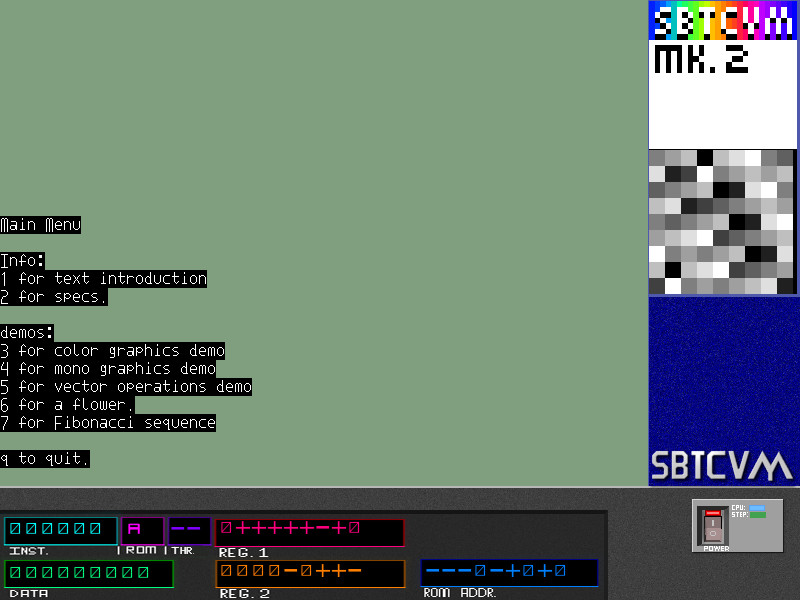
new menu

old menu
next lets take a look at the main menu:

compared to the old menu look, the new menu style looks much more polished, and less garishly blue. also the logo in the side of the window has changed to a more basic one, the lettering being overlaid on the blue background directly.  And to top things off, the status area actually shows something.


The about screen has been replaced by a new one featuring a scrolling credits motif. Complete with Logo and graphics that scroll smoothly with the text.


Not many changes in the vm itself, other than that side area logo change.

you might notice the new thread ID display as well.