SBTCVM now has its own blog! Check it out for information on all the latest developments!
https://sbtcvm.blogspot.com/

Welcome to LepVulpes Tech. from balanced ternary, to DIY tech and the maker scene, programming and more.
Showing posts with label SBTCVM. Show all posts
Showing posts with label SBTCVM. Show all posts
Wednesday, July 19, 2017

Sunday, June 18, 2017
SBTCVM has moved!
Well, after considerable thought, i decided SBTCVM needed a GitHub organization to be more unified, so, yea.
check out the new links.
SBTCVM on github
SBTCVM Project Home
SBTCVM Mark 2
any questions, feel free to ask.
check out the new links.
SBTCVM on github
SBTCVM Project Home
SBTCVM Mark 2
any questions, feel free to ask.
Saturday, May 27, 2017
SBTCVM: Benchmarking - part 2
if you read the previous post, you will remember me talking about not having benchmarked that Pentium 4? How does it compare to my much more modern 64bit laptop? lets find out!
I put both of them through 2 tests.
each of these two tests consisted of running the new benchmark1.trom Fibonacci benchmark 5 times with execution logging enabled.
results are in Operations(clock cycles) per second
with readouts enabled:
high: 183.7
low: 60.1
Average: 154.12
with readouts disabled:
high: 211.1
low: 90.9
Average: 177.26
Overall Average:
165.74
with readouts enabled:
high: 321.7
low: 310.8
average: 317.54
with readouts disabled:
high: 444.8
low: 399.5
average: 413.82
Overall Average:
365.68
2nd place: Pentium 4 at 165.74 operations/second average
I put both of them through 2 tests.
each of these two tests consisted of running the new benchmark1.trom Fibonacci benchmark 5 times with execution logging enabled.
results are in Operations(clock cycles) per second
Pentium 4:
Our first contestant is a 1.4Ghz Pentium 4 with 384MB ram.with readouts enabled:
high: 183.7
low: 60.1
Average: 154.12
with readouts disabled:
high: 211.1
low: 90.9
Average: 177.26
Overall Average:
165.74
AMD A4 dual core:
Our second contestent is a Dual core 64bit AMD at 1000Mhz Per core. with 4GB ram.with readouts enabled:
high: 321.7
low: 310.8
average: 317.54
with readouts disabled:
high: 444.8
low: 399.5
average: 413.82
Overall Average:
365.68
⚑⚐⚑⚐⚑ And now for the final Rank ⚑⚐⚑⚐⚑
1st place: AMD A4 at 365.68 operations/second average2nd place: Pentium 4 at 165.74 operations/second average
Friday, May 26, 2017
SBTCVM: Benchmarking
With a new execution log counter for seconds since start of execution, i decided to take a look at how well SBTCVM preforms.
if you are wondering what execution logs look like. Well, they are usually thousands and thousands of lines like this one:
data: 000000000 |Inst: --000- |adr: -----00+- |thread: -- |exec bank: A |reg1: 000++++++ |reg2: 000++++++ |tic #: 6590 |secs: 11.4083640575
tip: you can activate execution logging when launching with MK2-RUN.py by using the -le option.
That's from the end of colmap3's execlog to be exact. whats important here is "tic #" and "secs" by dividing the clock tic number by the time passed (secs), we can get the operations/second value of 577.
ranging from 607 operations/second for a stripped down variant of the
 "Dazzle" demo, to 286 for the Fibonacci demo, after calculating the average operations/second for several SBTCVM programs, it means out to around the ~460 operations/second range on a 64bit AMD A4 dual core on a puny 11 inch wide laptop.
with some CPU delay adjustment (I increased the delay time from 0.0005 to 0.001 seconds) I was even able to get SBTCVM Mark 2 working on a 1.4Ghz Pentium 4 with ~400MB ram. so no, you don't need a high end binary number-cruncher to run SBTCVM.
like any virtual machine, mileage WILL vary, as many factors affect how well SBTCVM preforms.
if you are wondering what execution logs look like. Well, they are usually thousands and thousands of lines like this one:
data: 000000000 |Inst: --000- |adr: -----00+- |thread: -- |exec bank: A |reg1: 000++++++ |reg2: 000++++++ |tic #: 6590 |secs: 11.4083640575
tip: you can activate execution logging when launching with MK2-RUN.py by using the -le option.
That's from the end of colmap3's execlog to be exact. whats important here is "tic #" and "secs" by dividing the clock tic number by the time passed (secs), we can get the operations/second value of 577.
ranging from 607 operations/second for a stripped down variant of the

with some CPU delay adjustment (I increased the delay time from 0.0005 to 0.001 seconds) I was even able to get SBTCVM Mark 2 working on a 1.4Ghz Pentium 4 with ~400MB ram. so no, you don't need a high end binary number-cruncher to run SBTCVM.
like any virtual machine, mileage WILL vary, as many factors affect how well SBTCVM preforms.
Tuesday, May 23, 2017
SBTCVM: a bit of graphical polish

 |
| old logo |
the lettering is the same shape, but more flat and polished.
 | |
| new menu |
 | |
| old menu |
compared to the old menu look, the new menu style looks much more polished, and less garishly blue. also the logo in the side of the window has changed to a more basic one, the lettering being overlaid on the blue background directly. And to top things off, the status area actually shows something.

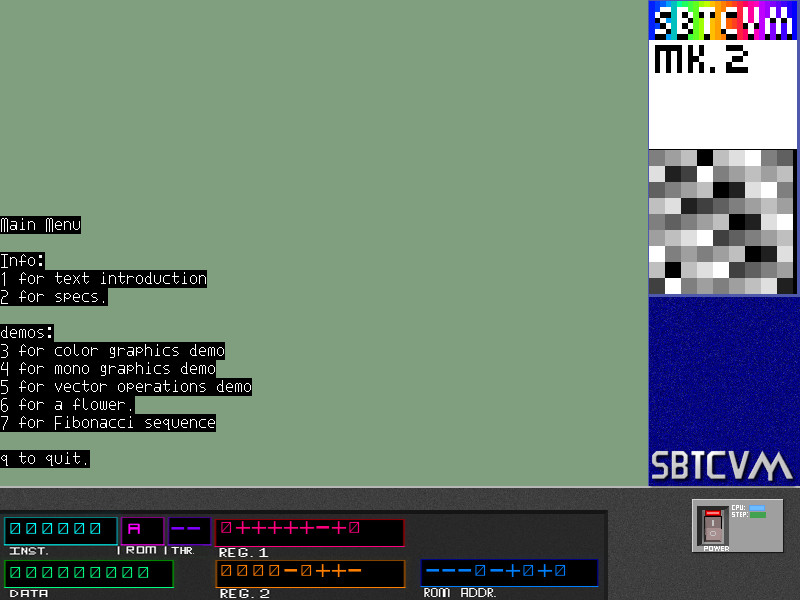
you might notice the new thread ID display as well.
Sunday, May 21, 2017
SBTCVM: now with a custom command shell

SBTCVM Command Shell
To run it, just start MK2-CS.py in a terminal.
When it first starts. it waits for libraries to load, prints its version string, then says its ready, prompting the user with a ":".
it has various uses. From working with SBTCVM utilities, to translating a balanced ternary integer to decimal.
naturally, the first thing a new SBTCVM user would be wise to do is type "help". doing this will spit out a few lists of commands like this:
:help
Commands:
run [arguments] : SBTCVM command line launcher. use "run help" for help.
asm [arguments] : SBTCVM assembler. "asm help" for help.
gfx [arguments] : SBTCVM graphics toolkit. use "asm help" for help.
list [type] : use "list help" for help on the list command.
help : this text
version : version info
about : about info
quit : quit SBTCVM command shell
math commands:
add : add two balanced ternary integers (separated by a space)
sub : subtract two balanced ternary integers (separated by a space)
div : divide two balanced ternary integers (separated by a space)
mul : multiply two balanced ternary integers (separated by a space)
btdec : convert a balanced ternary integer to decimal
decbt : convert a decimal integer to balanced ternary
invert : invert a balanced ternary integer
mpi : calculate the Max Positive Integer for a given number of trits
mcv : calculate the Max Combinations Value for a given number of trits
Interesting eh? those math commands mainly expose the underlying libbaltcalc integer mathematics API as various commands. also some more specialized functions are available. such as the MPI and MCV commands:
:mpi 9
9841
:mcv 9
19683
you might also have noticed the run, asm, and gfx commands. these call MK2-RUN.py, SBTCVM-asm2.py, and MK2-GFX.py respectively. You can use the same exact arguments that those utilities use:
asm -t thisisanexample
would assemble thisisanexample.tasm and create an apropiate tracelog just like:
./SBTCVM-asm2.py -t thisisanexample
also there is the list command. it can help when trying to see what files of a specific type are available. for example:
:list streg
VMSYSTEM/ROMS/fib.streg
VMSYSTEM/ROMS/gtt.streg
VMSYSTEM/ROMS/flower.streg
VMSYSTEM/ROMS/dazzle.streg
VMSYSTEM/ROMS/colmap3.streg
VMSYSTEM/ROMS/intro.streg
Saturday, May 20, 2017
SBTCVM: Working with SBTCVM assembly
Working with SBTCVM assembly.
OK. so SBTCVM is a balanced ternary virtual machine with an
oddball
assembly language. How hard is it?
(note: if you want to try the tutorial in this post, make sure you have SBTCVM installed. you can get it here. SBTCVM requires python and pygame as well.)
hello world:
textstart
Hello World
textstop
That wasn't hard was it?
Ok. so the other 99.9% of use cases are not that simple.
The assembler does have these nifty address references.
for example: the goto reference pointer (or "pointer" for short):
null|000000000|foobar
(some commands...)
(this data-based goto is pointed to that "pointer")
gotodata|>foobar
this is a basic loop. Basically whatever "(some commands...)" is, is looped. and it doesn't matter where the pointer is in the resulting ROM, as the assembler automatically calculates that for you.
there are also similar, but predefined, IObus references:
IOread1|>random
IOwrite1|>mem1
This example reads from the random integer port, and writes that random integer to scratch memory point 1 (the scratch memory ranges from mem1 to mem729)
 |
| Guess That Trit - Game |
oddball
assembly language. How hard is it?
(note: if you want to try the tutorial in this post, make sure you have SBTCVM installed. you can get it here. SBTCVM requires python and pygame as well.)
hello world:
textstart
Hello World
textstop
That wasn't hard was it?
Ok. so the other 99.9% of use cases are not that simple.
The assembler does have these nifty address references.
for example: the goto reference pointer (or "pointer" for short):
null|000000000|foobar
(some commands...)
(this data-based goto is pointed to that "pointer")
gotodata|>foobar
this is a basic loop. Basically whatever "(some commands...)" is, is looped. and it doesn't matter where the pointer is in the resulting ROM, as the assembler automatically calculates that for you.
there are also similar, but predefined, IObus references:
IOread1|>random
IOwrite1|>mem1
This example reads from the random integer port, and writes that random integer to scratch memory point 1 (the scratch memory ranges from mem1 to mem729)
Lets look at how the Fibonacci demo works:
Thursday, May 18, 2017
A Game in SBTCVM?
 A Game in SBTCVM? What is this magic? 😮
Ok, Seriously now. Its a number guessing game called Guess That Trit. 
The goal is to guess a randomly chosen trit. Its not going to win a game of the year award... but it does work.
And it tracks score and the number of rounds played.
Tuesday, May 16, 2017
SBTCVM now has a pause menu

You can press escape again, or select "Continue VM" to continue the VM, refresh on the key controls in "Quick Help", view the about screen, or Stop the VM. The pause menu will even have "Exit to Main Menu" instead of "Stop VM" if you launched SBTCVM from the main menu.
like the main menu, more features may be added in the future.
SBTCVM, TTYs, and Fibonacci
SBTCVM Mark 2 just got an upgrade:
its TTY is now 72 columns by 54 lines, as opposed to 36 columns by 27 lines.
So i took the liberty of enhancing a few demos.
 Old Fibonacci demo:
It only calculated a positive sequence.

New Fibonacci demo:
with the extra space, i decided to add a negative sequence too :)
its TTY is now 72 columns by 54 lines, as opposed to 36 columns by 27 lines.
So i took the liberty of enhancing a few demos.

It only calculated a positive sequence.

New Fibonacci demo:
with the extra space, i decided to add a negative sequence too :)
Wednesday, May 10, 2017
SBTCVM Mark 2 gets a menu system.
SBTCVM Mark 2, (SBTCVM is a project of mine to make a balanced ternary VM people can actually use) can be a complex program. Few people seem to have tried to visualize a balanced ternary computer on a binary one. Likely, for good reason too, as developing SBTCVM feels a lot like trying to emulate a pear on a orange at times.

I find one the strangest aspects of balanced ternary is its negative state. you see, balanced ternary handles negative values in a different way then say, decimal:
+- | 2
-+ | -2
+0 | 3
-0 | -3
+-0 | 6
-+0 | -6
Odd huh? how zero is the most central value of the base instead of it being the lowest. notice how +- is 1 less than +0?
Anyways With the new menu system, people who are new to SBTCVM can more easily see what its like, and learn.
 It even has an extras menu. not much there now, just that clock. Perhaps more extras and other menu features will be added as time goes on...
cheers.
Subscribe to:
Posts (Atom)